
Funding your Royal X Casino account is fast, secure, and completely straightforward. Choose from EasyPaisa, JazzCash, Bank Transfer, or USDT crypto – all deposits are processed instantly so you can start playing within minutes. First-time depositors receive a 200% match bonus.

Pakistan's most popular mobile wallet. Send directly from the app, USSD code, or an EasyPaisa agent.
Min Deposit
Rs.100
Processing
Instant
Fee

Deposit via JazzCash app, USSD (*786#), or any JazzCash retailer. Available 24 hours a day.
Min Deposit
Rs.100
Processing
Instant
Fee

Online banking, ATM transfer, or cash deposit at the branch. Works with all major Pakistani banks.
Min Deposit
Rs.500
Processing
Fee

Deposit using USDT on TRC20 or ERC20 network. Low network fees and maximum privacy.
Min Deposit
Processing
Fee
Select your payment method below for a detailed, step-by-step walkthrough:
Log In to Royal X Casino
Open the Royal X Casino app and log in using your registered mobile number and password. Make sure you are on a stable internet connection before proceeding.
Open the Deposit Section
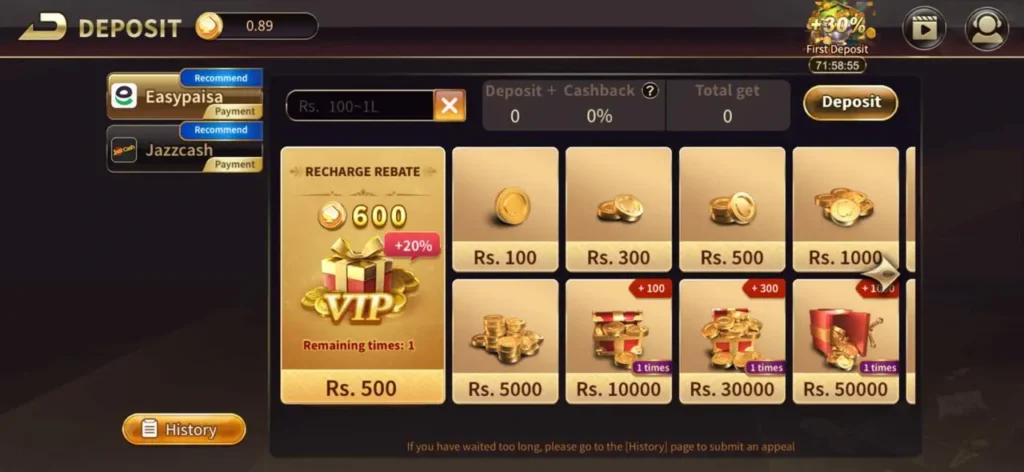
Tap the Wallet icon at the top of the dashboard (shown as a coin/purse icon). On the next screen, tap Deposit.
Select EasyPaisa
From the payment method list, tap EasyPaisa. The platform will display the dedicated EasyPaisa account number to send your funds to.
Enter Your Deposit Amount
Type the amount you wish to deposit in the Royal X Casino deposit form. The minimum is Rs.100. Note this amount – you must send exactly this amount via EasyPaisa.
Switch to your EasyPaisa app. Go to Send Money → Send to Mobile Account. Enter the account number shown in Royal X Casino, enter the exact deposit amount, and confirm using your EasyPaisa PIN.
Copy the Transaction ID
After the EasyPaisa payment completes, you will receive an SMS with a Transaction ID (a unique alphanumeric reference number, e.g. EP123456789). Copy this number exactly.
Confirm in the Royal X Casino App
Return to the Royal X Casino deposit form. Paste your Transaction ID into the Reference Number field and tap Confirm Deposit. Your balance will be updated within seconds.
Log In & Open Deposit
Open the Royal X Casino app, log in, tap the Wallet icon, then tap Deposit.
Choose JazzCash
Select JazzCash from the payment methods. Note the JazzCash account number displayed – this is where you will send your money.
Enter Amount
Type your deposit amount (minimum Rs.100) and note the exact figure to enter in JazzCash.
Send via JazzCash App
Open the JazzCash app → tap Send Money → enter the account number → enter the exact amount → confirm with your JazzCash MPIN.
Get the Transaction Reference
After payment, JazzCash sends a confirmation SMS with a Transaction ID. Copy this number carefully.
Submit in Royal X Casino
Paste the Transaction ID into the Royal X Casino deposit Reference Number field and tap Confirm. Your balance updates instantly.
Open Deposit & Select Bank Transfer
In the Royal X Casino app, go to Wallet → Deposit → Bank Transfer. The platform will display bank account details (bank name, account number, IBAN, account title).
Enter Deposit Amount
Enter your desired deposit amount (minimum Rs.500) in the Royal X Casino form. Note this amount for the transfer.
Make the Bank Transfer
Log in to your online banking or visit your bank branch/ATM. Transfer the exact amount to the account details shown. You can use:
► Internet Banking – funds transfer within the same bank or IBFT
► ATM Transfer – most ATMs support interbank transfers
► Cash Deposit – deposit cash directly at the bank counter
Upload Transfer Proof
Take a screenshot or photo of your bank transfer receipt showing the transaction reference, amount, date, and destination account. Upload this in the Royal X Casino deposit confirmation screen.
Wait for Confirmation
Bank transfers are verified manually and typically credited within 15 minutes to 2 hours. You will receive an in-app notification when your balance is updated.
Select USDT in the Deposit Section
In the Royal X Casino app, go to Wallet → Deposit → USDT. Choose your preferred network: TRC20 (Tron, lower fees) or ERC20 (Ethereum).
Copy the Deposit Wallet Address
The app will display a unique USDT wallet address and a QR code. Tap Copy Address to copy it to your clipboard. Double-check the first and last 4 characters after pasting
Send USDT from Your Wallet
Open your crypto wallet app (Binance, Trust Wallet, OKX, etc.), go to Send/Withdraw USDT, paste the Royal X Casino wallet address, select the matching network (TRC20 or ERC20), enter the amount (minimum $5), and confirm the transaction.
Wait for Blockchain Confirmation
USDT deposits are credited after 1–2 blockchain confirmations, which typically takes 5 to 15 minutes. TRC20 confirmations are faster than ERC20.
Balance Credited Automatically
Once confirmed on the blockchain, your Royal X Casino balance is updated automatically. No manual confirmation is needed for USDT deposits.
Here are some frequently asked questions about Royal X Casino for players in Pakistan:
Log in to your account or register free – your 200% first deposit bonus is waiting.